
Darik's Boot and Nuke(简称"DBAN"),是一个独立的引导映像,它可以安全地擦除电脑上硬盘数据以及U盘上的数据文件,再牛逼的数据恢复软件也无从恢复。适用于各种机密文件的销毁工作,欢迎下载!
Dariks Boot And Nuke使用介绍
DBAN为个人用户免费擦除软件设计。 它会自动删除任何硬盘的内容,它可以检测到。 这种方法可以防止身份盗窃之前回收一台电脑。DBAN也是一种常用的解决方案将病毒和间谍软件从微软的Windows安装。
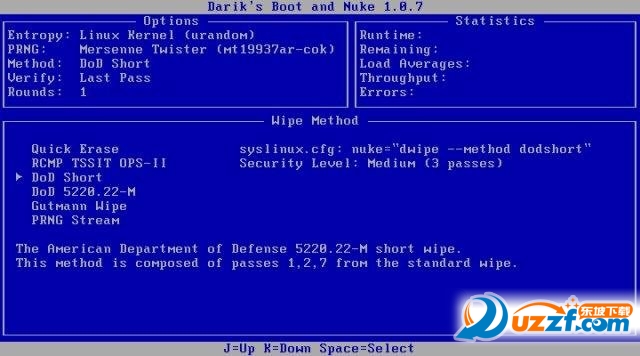
Dariks Boot and Nuke采用了下面集中方式擦除硬盘数据:
dod 聽 聽 聽 Wipe all disks with the DoD 5220.22-M method.
dodshort 聽Wipe all disks with the short DoD 5220.22-M method. (Default.)
ops2 聽 聽 聽Wipe all disks with the RCMP TSSIT OPS-II method.
gutmann 聽 Wipe all disks with the Gutmann method.
prng 聽 聽 聽Wipe all disks with the PRNG Stream method.
quick 聽 聽 Wipe all disks with the Quick Erase method.
DBAN用户应该知道一些产品的局限性,包括:
不能保证数据的删除(例如DBAN不检测或安全地擦除ssd)
没有audit-ready法规遵从性报告
有限的硬件支持(如无RAID拆除)
没有客户支持或常规的软件更新
Dariks Boot And Nuke使用教程
知识兔小编这里分享的是iso镜像文件,安装后直接用来启动电脑即可完成数据的清除。可以分别从 Windows 和 Linux 下创建 DBAN CD-R 或 DBAN U 盘 启动盘。
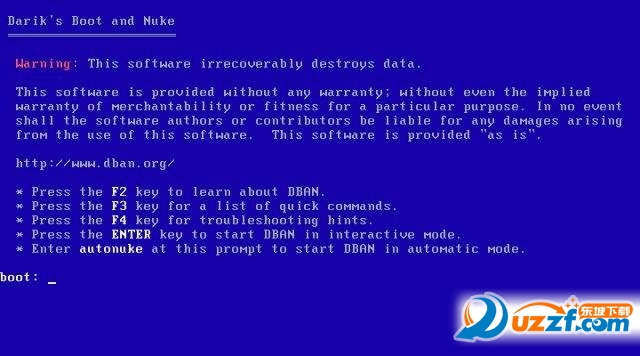
这是启动后的窗口界面:按[Enter]键可以进入功能菜单
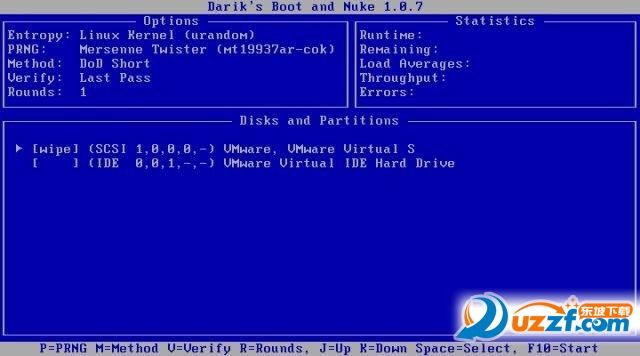
选择磁盘或者分区:
选择数据擦除模式:
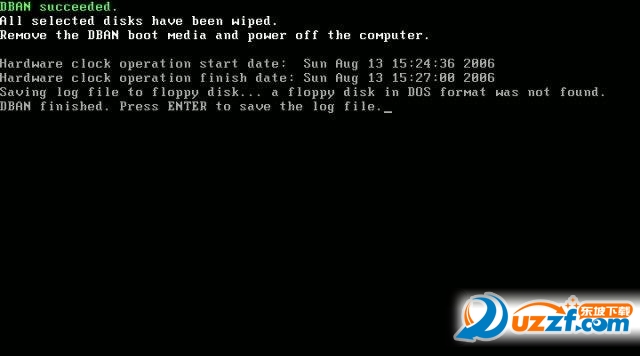
数据文件已经完全擦除:
使用还是蛮简单的,需要的朋友下载试试吧!
下载仅供下载体验和测试学习,不得商用和正当使用。
下载体验